2026 Best Video Keypad Door Entry Systems for Buyers
Choosing a door entry system means balancing security, convenience, and everyday usability. Video Keypad Door Entry systems combine a camera, two-way communication, and PIN access in one setup. That can help residents identify visitors before opening the door. It can also make access easier for households that do not want to manage physical keys.
A clear image matters, but specifications alone do not tell the whole story. A camera may struggle with a bright porch light, a shaded face, or a narrow viewing angle. Buyers should also check keypad visibility at night, weather ratings, app requirements, storage options, and compatibility with existing door hardware. Details matter. Installation is another practical concern: wiring, Wi-Fi strength, and power supply can affect performance after the box is opened.
This 2026 buyer’s guide compares key features and trade-offs across popular system types. It focuses on what shoppers can verify, including video quality, access controls, response options, and ongoing costs. Look closely at how each model handles PIN management and visitor alerts. Check warranty terms and support availability, too. Trade-offs remain. A feature-rich unit may cost more or require extra setup, while a simpler model may leave out useful controls. Use this overview to narrow your choices, then confirm current specifications with the manufacturer before buying.
What Video Keypad Door Entry Systems Are and How They Work
2026 Best Video Keypad Door Entry Systems for Buyers
What Video Keypad Door Entry Systems Are and How They Work
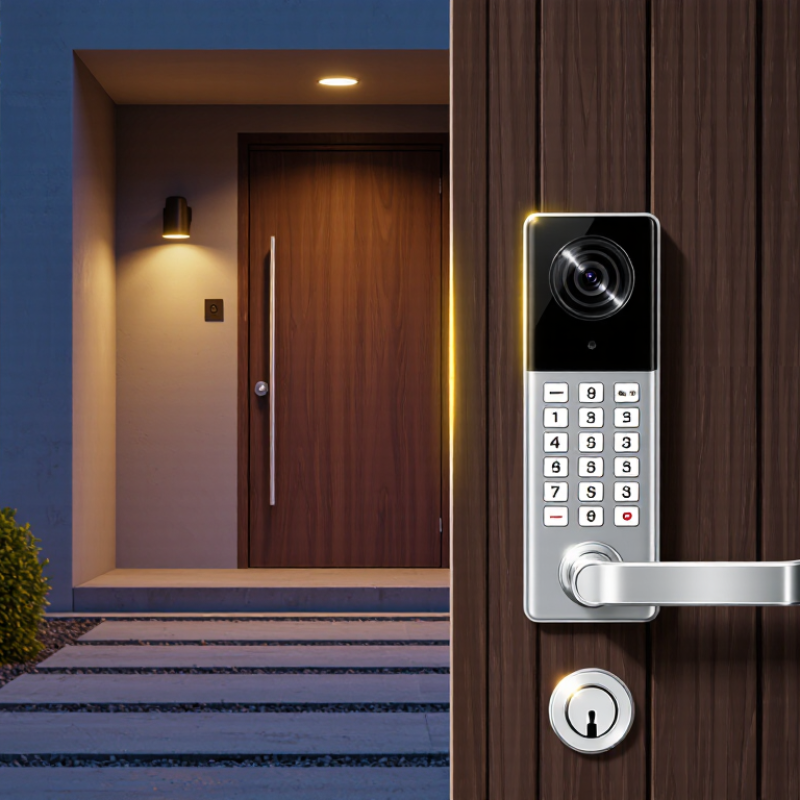
A video keypad door entry system combines a camera, microphone, speaker, keypad, and door-release control. Visitors can enter an approved code or call someone inside. The camera sends a live image to an indoor screen or connected phone, so the resident can speak with the visitor before deciding whether to unlock the door. A keypad code is checked by the system’s controller. If it matches an active credential, the controller signals an electric strike or other compatible lock to release. The door does not open by itself; the lock and installation determine how release works.
In daily use, a visitor might press a call button while carrying groceries, then wait for an answer. Some systems use a local connection, while others rely on a network, so check what happens during an internet or power interruption. Video can help with recognition, but it cannot prove who someone is. Lighting, camera angle, and a delayed connection can all affect what you see. It is worth reviewing how access codes are added, changed, and removed; this detail is easy to overlook.
Tips: Mount the camera near face height and test it at night. Use distinct codes for regular users, and change temporary codes when they are no longer needed. Keep a physical key or other backup access method.
Key Features to Compare in 2026 Models
In 2026, compare video keypad entry systems by how they perform at your actual doorway, not just by camera resolution. Check keypad visibility in direct sunlight and whether buttons respond with wet or gloved fingers. Small details matter. Look for a wide, well-lit camera view, clear two-way audio, and adjustable motion zones that avoid constant alerts from passing cars. Check the night view. A sharp image can still be unhelpful if porch lights create glare or a visitor’s face falls outside the frame. Also compare recording options, notification speed, and whether the system keeps working during an internet outage.
Security deserves equal attention. NISTIR 8259A, a cybersecurity report for Internet of Things devices, identifies six core capabilities, including device identification, data protection, software updates, and cybersecurity-state awareness. Use those areas as questions for the manufacturer: Can you enable multifactor sign-in? Are updates delivered automatically? Can access codes be removed promptly? These checks matter when a temporary code outlives a delivery or guest visit. Compare weather ratings and power backup, too. A system that looks capable on paper may struggle at a shaded, rain-exposed entrance; that is worth testing before purchase.
How to Choose a System for Your Property and Access Needs
2026 Best Video Keypad Door Entry Systems for Buyers
How to Choose a System for Your Property and Access Needs
Choosing a video keypad entry system starts with the people and entrances it must serve. A small home may need one outdoor unit and clear visitor video. A multi-unit property may need separate codes, timed access, and a way to manage frequent deliveries. Check how the camera performs in shade and after dark. A bright screen in a showroom can look different beneath a porch roof.
Consider the connection, power supply, and installation location before comparing features. Wi-Fi may be convenient, but a weak signal near a metal gate can cause delays. Ask how the system behaves during an outage, and whether residents can still enter. Review how access codes are issued, changed, and removed. Privacy matters too: decide who can view recordings and how long they are stored. No setup fits every property perfectly. Even a useful system may take some adjustment.
Tips: Test the keypad with gloves and in low light. Check video from the actual visitor approach, not just straight on. Keep instructions for visitors simple. If several people manage access, agree on a routine for updating codes; otherwise, small oversights can linger.
2026 Best Video Keypad Door Entry Systems: Choosing by Property Needs
Compare the relative importance of common access needs across property types. Scores are illustrative planning ratings from 1 (low priority) to 5 (high priority), not measured product-performance data.
For multi-unit buildings, prioritize managing multiple residents and visitor screening. For homes and small offices, remote access and visitor screening may be more relevant. Consider installation conditions and expected user volume when comparing systems.
Installation, Connectivity, and Ongoing Costs
A video keypad door entry system is only as dependable as its installation. Check the door frame, existing wiring, and Wi-Fi signal before choosing a location. A thick exterior wall can weaken the connection, while direct rain may shorten the life of exposed equipment. If wiring is needed, ask a qualified installer to estimate labor and any parts separately. Measure twice. Keep a physical key or other backup access method available in case power or internet service fails.
Tips: Test the camera view at night, not just in daylight. Stand where visitors will actually wait, and check whether faces remain clear under porch lighting. Save a little room in the budget for a stronger network connection or a small power backup. These details are easy to overlook.
Ongoing costs vary. Some systems work without a recurring fee, while cloud video storage or remote features may require a subscription. Check what still works if that service ends. Also account for batteries, replacement parts, and occasional maintenance; a keypad exposed to cold weather may need more attention. Compare the full cost over several years, not just the price on the box. Estimates can still miss small installation complications, so leave a modest contingency.
Privacy, Security, and Maintenance Considerations
A video keypad entry system records more than a visitor’s face. It may also store arrival times, access events, and household routines. Check what the device saves and how long recordings remain available. Set a short retention period when practical. Aim the camera at the entrance, not a neighbor’s window or a busy public walkway. Small details matter.
Use separate access codes for household members and trusted visitors when the system allows it. Remove codes promptly when access is no longer needed. Avoid easy sequences, such as repeated digits, and change any code that may have been observed. Keep the keypad visible and well lit, but avoid placing it where passersby can watch each entry. A camera helps identify activity; it does not replace a sound door, secure frame, or careful locking routine. That distinction is easy to forget.
Maintenance is often less exciting than installation, but it affects reliability. Wipe dust and water spots from the lens with a soft cloth. Check the keypad, doorbell, seals, and power source during ordinary household checks. Test entry from outside, not only through the indoor app. Review software and account settings periodically, especially after a phone or household change. Even then, no system is flawless; a missed notification or dead battery can happen, so keep a practical backup way to enter.